EXIF, IPTC, and XMP: What They Are and Where They Hide in Photos
Metadata are hidden data in photos. Discover what EXIF, IPTC, and XMP are, what they are used for, and why it is beneficial to know.

Every photo you take contains more information than you see. That's metadata: data hidden inside the image file.
It's there for practical reasons. It helps organize photos, find them, and identify their creator. Cameras add some of it; people add the rest. The main types are EXIF, IPTC, and XMP.
They don't all matter equally for SEO. Google ignores EXIF. But it can read some IPTC and XMP fields. These include the creator and copyright.
So it helps to know where each detail lives. We've already covered removing metadata in EXIF in photosEXIF in photos.
Here, we'll look at where metadata lives. We'll also see what matters for Google Images.
Where EXIF, IPTC, and XMP hide inside a photo
Imagine a box with several compartments. The box is your photo file. One compartment holds the pixels: the image you see. The others hold metadata. That's why you see just one file in your folder. Copy or send it, and the metadata goes along.
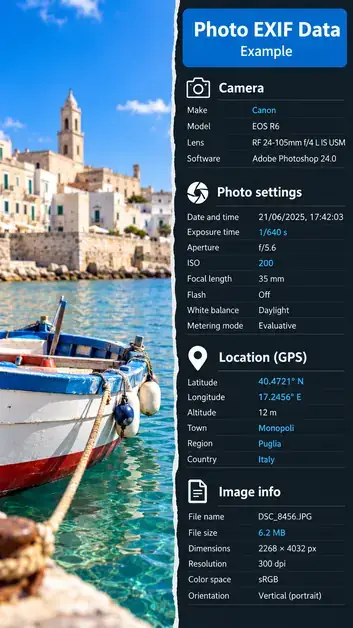
The first compartment holds EXIFEXIF data. Your camera writes it automatically when you take the photo. It holds technical details: your phone model, date, time, settings, and often GPS coordinates. It tells you how the photo was taken.
The second compartment holds IPTC data. It's a standard created for newspapers and photo agencies. People usually add this information after taking the photo. It includes the title, caption, keywords, photographer's name, and copyright. It tells you who took the photo and what's pictured.
The third compartment holds XMP data. Adobe created this format. Think of it as a flexible container for almost anything. These days, IPTC fields are stored inside XMP. It can also track edits made in Photoshop or Lightroom.
Some details appear in more than one compartment. The photographer's name, copyright, and date are common examples.